Office operations platform saving 2,000 person-hours a month

Office operations platform saving 2,000 person-hours a month

Samokat.Tech – Contract management platform that cut operations costs by 75%

INDUSTRY:

ENTERPRISE TOOLS

YEAR:

2022

EXPERIENCE:

PRODUCT DESIGN

01. about

One of Eastern Europe's largest tech companies – often called "the Google of the region." Yandex builds products across search, maps, ride-hailing, food delivery, music, video streaming, AI assistants, and smart devices. From a browser with a built-in AI assistant to smart speakers and autonomous vehicles, Yandex operates across nearly every layer of digital and physical life.

One of Eastern Europe's largest tech companies – often called "the Google of the region." Yandex builds products across search, maps, ride-hailing, food delivery, music, video streaming, AI assistants, and smart devices. From a browser with a built-in AI assistant to smart speakers and autonomous vehicles, Yandex operates across nearly every layer of digital and physical life.

One of Eastern Europe's largest tech companies – often called "the Google of the region." Yandex builds products across search, maps, ride-hailing, food delivery, music, video streaming, AI assistants, and smart devices. From a browser with a built-in AI assistant to smart speakers and autonomous vehicles, Yandex operates across nearly every layer of digital and physical life.

[ 01 ]

[ 00 ]

30,000+ Employees

Working in offices worldwide

[ 02 ]

[ 00 ]

50M+ Monthly Active Users

On all Yandex services

[ 03 ]

[ 00 ]

10,000+ Spaces

Across all office locations

02. The challenge

Office managers at Yandex inspected thousands of spaces daily — checking furniture, equipment, supplies, and safety items across every floor. The process was entirely manual: walk the floor with a notebook, transfer notes to Excel, then create a separate Jira ticket
for each issue and assign it to the right person.

A broken door meant finding the right technician, opening Jira, filling out the ticket, and hoping it lands in the correct queue. Multiply that by hundreds of spaces and dozens of managers — and the system breaks down fast.

Office managers at Yandex inspected thousands of spaces daily — checking furniture, equipment, supplies, and safety items across every floor. The process was entirely manual: walk the floor with a notebook, transfer notes to Excel, then create a separate Jira ticket
for each issue and assign it to the right person.

A broken door meant finding the right technician, opening Jira, filling out the ticket, and hoping it lands in the correct queue. Multiply that by hundreds of spaces and dozens of managers — and the system breaks down fast.

🚫

Hours per inspection

Manual note-taking and Excel entry after every shift

🚫

1 issue = 4 manual steps

Find assignee → open Jira → fill ticket → hope it's right

🚫

Misrouted tickets

Tickets landed with the wrong person – wasted time, wasted resources

03. Product Overview

Checklist App (Tablet)

Office managers walk the floor with a tablet, go through the checklist, mark issues, and attach photos. A ticket is automatically created and routed to the right technician. No Jira, no manual steps.
Admin Panel

Lead managers configure the entire system: spaces, inspection objects, defect types, assignees, and routing rules. Every connection between entities lives here — and if something is misconfigured, tickets go to the wrong person.

04. Research & Insights Checklist App (Tablet)

04. Research
& Insights

04. Research & Insights Checklist App (Tablet)

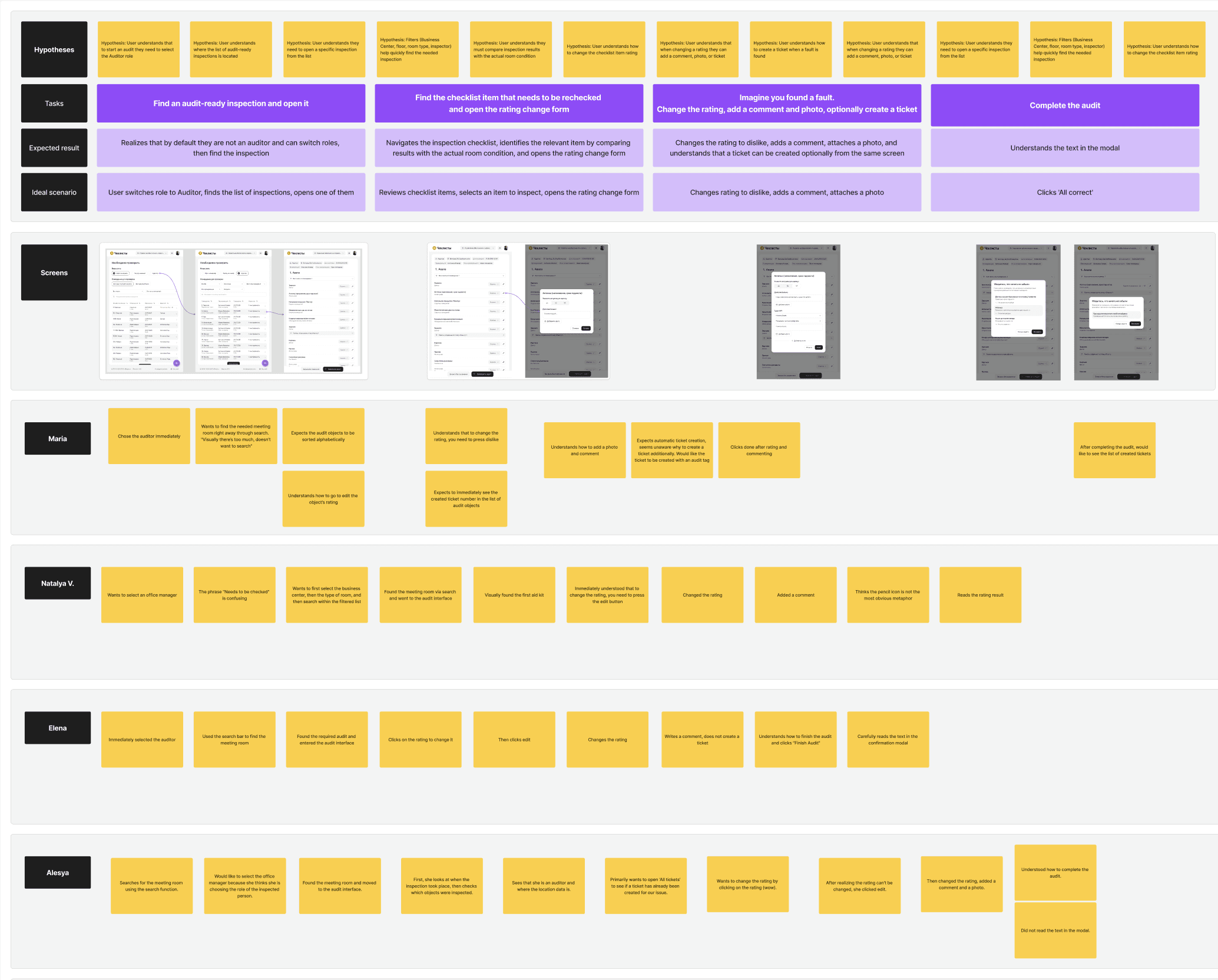
To map the audit scenario and identify friction points, I conducted a series of moderated usability tests with office managers and supervisors observing real inspection workflows.

One of the core scenarios in the product is inspection auditing – supervisors review their team's work, flag mistakes, and trigger penalty tickets.

To map the audit scenario and identify friction points, I conducted a series of moderated usability tests with office managers and supervisors observing real inspection workflows.

One of the core scenarios in the product is inspection auditing – supervisors review their team's work, flag mistakes, and trigger penalty tickets.

Key findings:

[ 01 ]

[ 00 ]

Users selected the wrong role on the first screen — choosing "inspector" instead of "auditor" due to a misleading header

[02]

[ 00 ]

Most users tried to change an evaluation by tapping the current score, not by going into edit mode

[03]

[ 00 ]

It wasn't clear where the inspector's data ended and the auditor's comments began

[04]

[ 00 ]

Low contrast on key buttons caused users to miss critical actions entirely
05. JTBD

04. User Workflows
(JTBD)

Through research and interviews, I mapped the core jobs-to-be-done across two user groups — the auditor conducting the review and the stakeholders monitoring quality at scale.

Through research and interviews, I mapped the core jobs-to-be-done across two user groups — the auditor conducting the review and the stakeholders monitoring quality at scale.

Auditor (senior office manager)

[ 01 ]

[ 00 ]

When I conduct an audit, I want to see exactly where my team's inspections don't match reality — so I can address mistakes and improve inspection quality.

[02]

[ 00 ]

When I review a completed checklist, I want to quickly spot discrepancies and create tickets where needed — so issues get fixed without extra back-and-forth.

Stakeholder (operations leadership)

[ 01 ]

[ 00 ]

When I monitor inspection quality, I want quantitative data on how each office manager performs — so I can make objective decisions on bonuses and process improvements.

[02]

[ 00 ]

When inspections are completed incorrectly, I want to understand the root cause — so I can fix the process, not just the symptom.

[03]

[ 00 ]

When managing office operations at scale, I want to reduce the cost of missed or poor-quality inspections — so the team runs efficiently and budget isn't wasted.

06. Flow
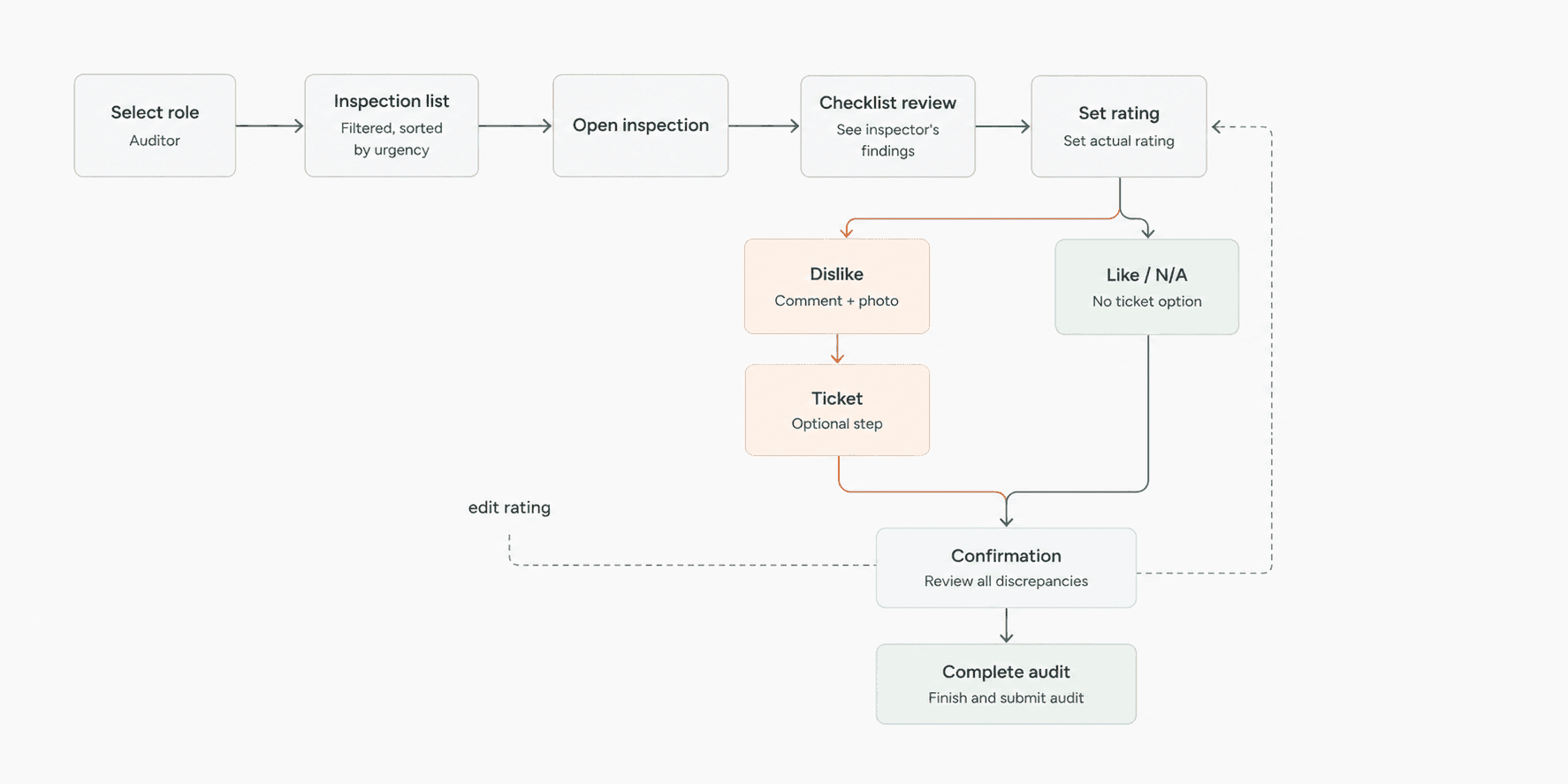
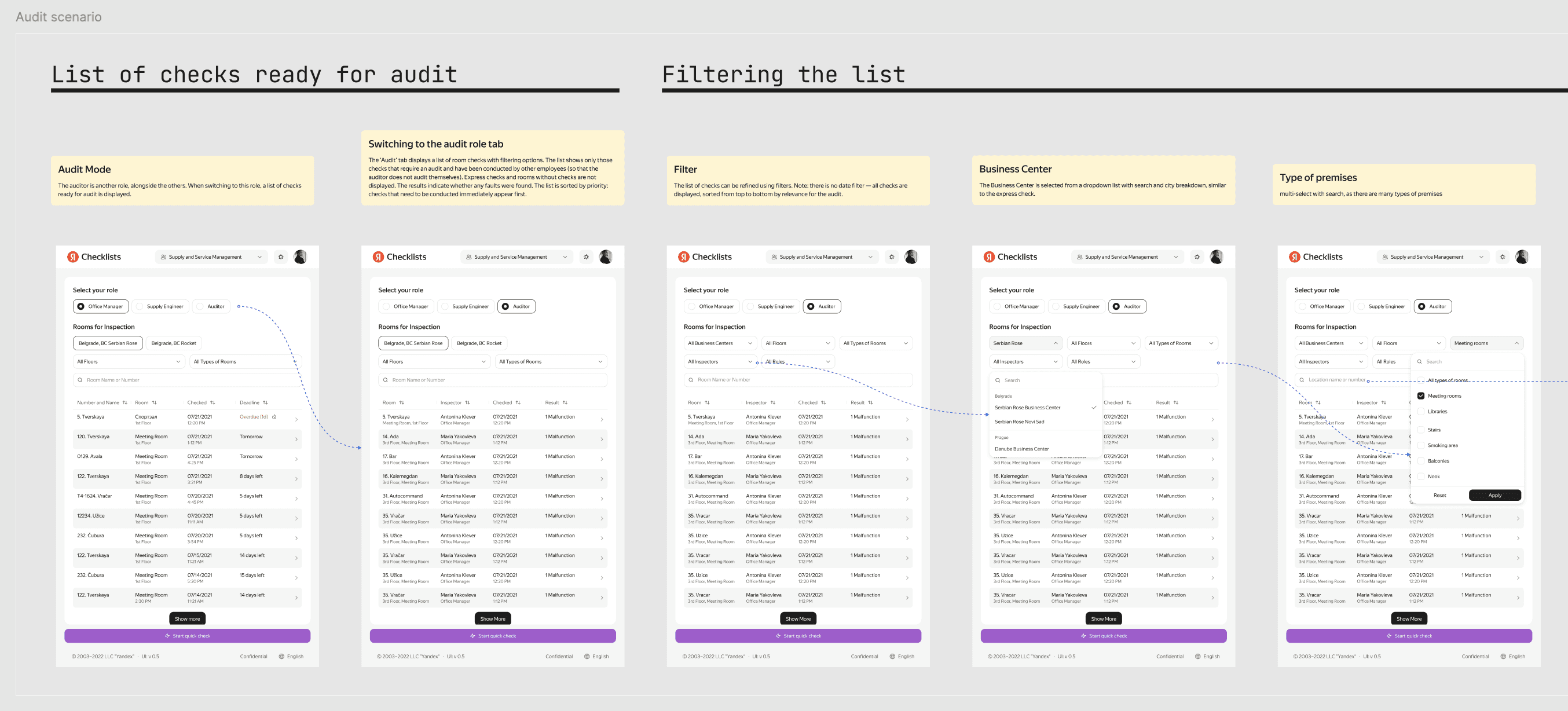
I mapped the full audit scenario end-to-end — from role switching and inspection filtering to checklist review, discrepancy marking, ticket creation, and final confirmation before submission.

I mapped the full audit scenario end-to-end — from role switching and inspection filtering to checklist review, discrepancy marking, ticket creation, and final confirmation before submission.

07. Design & Testing

I designed the first iteration of screens and ran moderated usability tests with real auditors.

After incorporating the findings, the second round showed clear improvement — fewer misclicks, role selection was no longer confusing, ticket creation felt natural, and the separation between inspector and auditor data was immediately readable.

I designed the first iteration of screens and ran moderated usability tests with real auditors.

After incorporating the findings, the second round showed clear improvement — fewer misclicks, role selection was no longer confusing, ticket creation felt natural, and the separation between inspector and auditor data was immediately readable.

08. Final Design Delivery

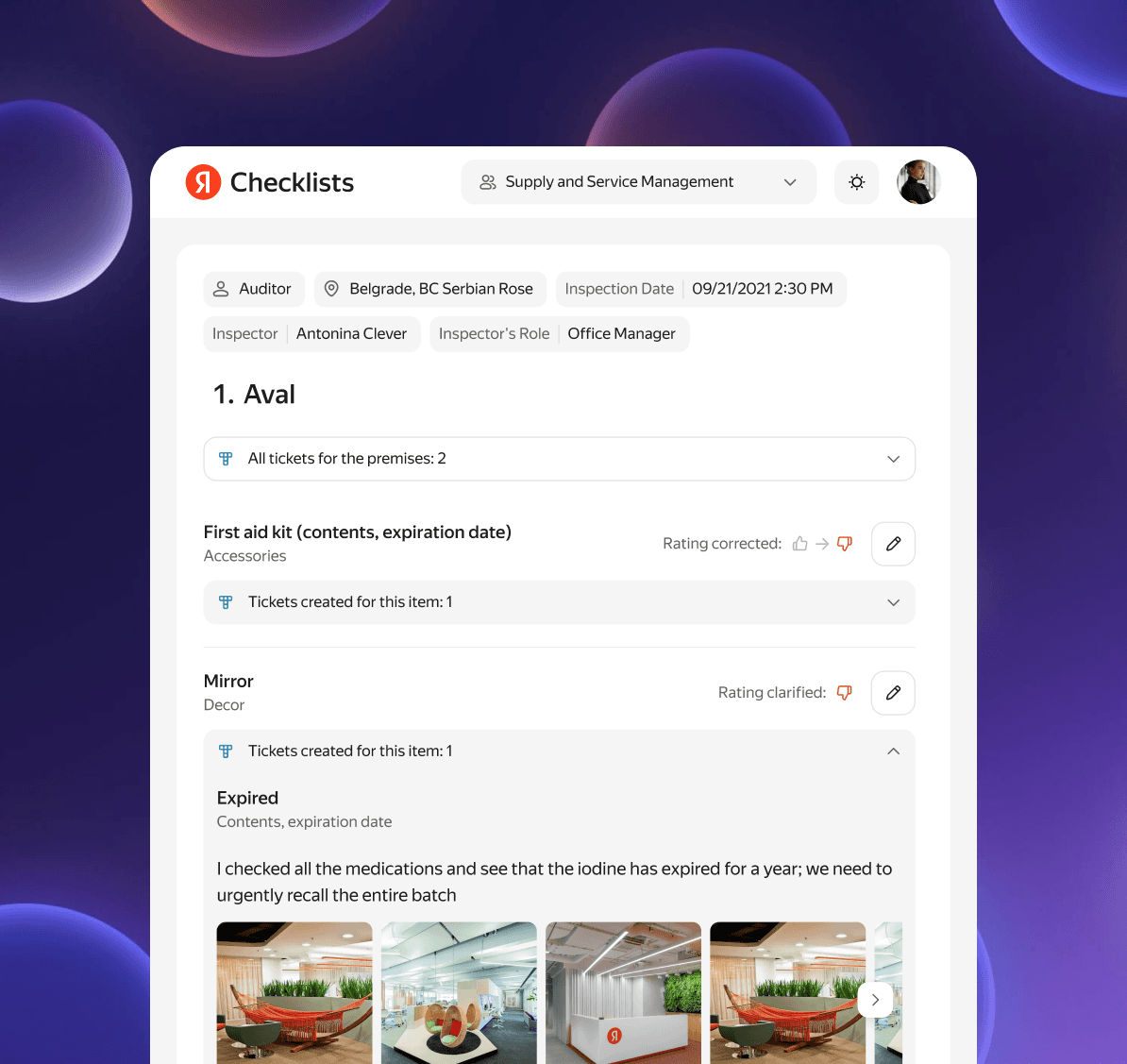
Based on the test results, I refined the copy, clarified interactions, and prepared final mockups with documented logic for the development team. The design was handed off to production.

Based on the test results, I refined the copy, clarified interactions, and prepared final mockups with documented logic for the development team. The design was handed off to production.

09. Research & Insights Admin Panel

09. Research
& Insights
Admin Panel

09. Research & Insights Admin Panel

To understand how the admin panel actually worked in practice, I conducted in-depth interviews with office managers, lead managers, and technicians.

Key findings:

— Admins didn't know which defects were attached to an inspection object or where they were routed

— Editing a defect group felt risky — no way to know which other locations would be affected

— Finding why a ticket went to the wrong queue required manually opening three separate pages

— When adding a new inspection object, there was no way to quickly verify the configuration was correct

To understand how the admin panel actually worked in practice, I conducted in-depth interviews with office managers, lead managers, and technicians.

Key findings:

— Admins didn't know which defects were attached to an inspection object or where they were routed

— Editing a defect group felt risky — no way to know which other locations would be affected

— Finding why a ticket went to the wrong queue required manually opening three separate pages

— When adding a new inspection object, there was no way to quickly verify the configuration was correct

10. User Stories & JTBD Admin Panel

10. User Stories
& JTBD
Admin Panel

10. User Stories & JTBD Admin Panel

Collecting User Stories across all admin roles revealed a clear pattern — every role was struggling with the same invisible chain of entities, just from a different angle.

Collecting User Stories across all admin roles revealed a clear pattern — every role was struggling with the same invisible chain of entities, just from a different angle.

Key User Stories:

[ 01 ]

[ 00 ]

As a queue admin, I want to find a defect and fix its routing — without removing it from the group and breaking all other connections.

[02]

[ 00 ]

As a queue admin, I want to know why a defect is going to the wrong queue — so I can fix it.

[03]

[ 00 ]

As a queue admin, I want to know which objects and spaces a defect is attached to — so I don't break anything when editing.

[04]

[ 00 ]

As a queue admin, I want to search for a defect in the object group list — to save time instead of scrolling through everything

Key JTBD:

[ 01 ]

[ 00 ]

When I need to set up a new inspection object, I want to see which defects are already linked and where they're routed — so I don't waste time searching across multiple lists.

[02]

[ 00 ]

As a queue admin, I want to know why a defect is going to the wrong queue — so I can fix it.

11. Define Admin Panel

11. Define Admin Panel

Based on research, I mapped the full entity chain the admin has to navigate. Any misconfiguration at any level breaks ticket routing — silently, with no warning.

Office Building → Space → Inspection Object → Defect Group → Defect → Queue

Two scenarios kept surfacing across interviews — each breaking the workflow at a different point in the chain:

Based on research, I mapped the full entity chain the admin has to navigate. Any misconfiguration at any level breaks ticket routing — silently, with no warning.

Office Building → Space → Inspection Object → Defect Group → Defect → Queue

Two scenarios kept surfacing across interviews — each breaking the workflow at a different point in the chain:

🐝

Scenario 1

There are no defects configured for an inspection object in a space. The admin needs to find that object and set up the correct defects with the correct routing.

🐝

Scenario 2

A defect exists but has wrong routing. The admin needs to trace the full chain, find where it breaks, and fix it — without affecting other locations.

Design Goal

At every step of the admin's path, show all entity relationships in context — so they can configure confidently without breaking other locations.

12. Design Admin Panel

12. Design Admin Panel

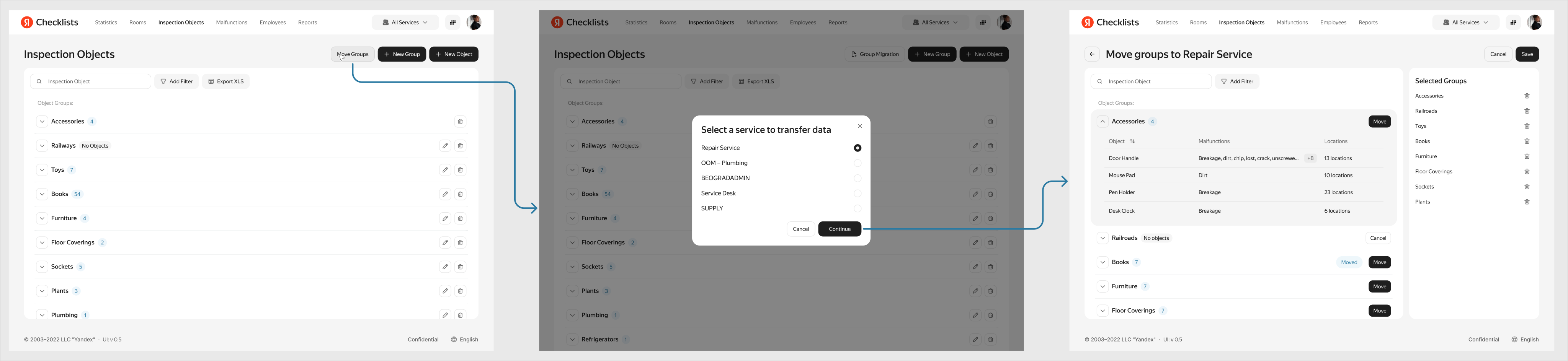
I designed the first iteration of screens and ran a quick usability test — the core flows were clear. One issue surfaced: moving defect groups between objects caused confusion and duplicates.

I added a dedicated transfer mode: select groups, review the selection, confirm. Repeat transfers are blocked with an inline error. Previously transferred groups are shown upfront.

I designed the first iteration of screens and ran a quick usability test — the core flows were clear. One issue surfaced: moving defect groups between objects caused confusion and duplicates.

I added a dedicated transfer mode: select groups, review the selection, confirm. Repeat transfers are blocked with an inline error. Previously transferred groups are shown upfront.

[ Results ]

Key Results & Impact

0x

0x

Faster inspection completion

Average time to log a defect
and route a ticket

5

1 min

-0%

-0%

Misrouted tickets

0x

0x

Faster inspection completion

Average time to log a defect
and route a ticket

5

1 min